

App settings
Rename an app, choose the branch it deploys from, see where its code lives, and take an app offline, hand it to someone else or delete it.
Each app's Settings tab has these sections: General, Git, Domains, Database, Variables and, on plans with the agent, What the builder remembers. Everyone in the workspace can read them. Owners, admins and members can change most of them; viewers can only look. Agent approvals and the Danger zone need an owner or admin.
General
- App name: up to 80 characters.
- Deploys from: the branch every deploy builds, picked from a list of the repository's branches, with the default branch first. Type in the list's search to find one by name. With no branch chosen, the app follows the repository's default branch. Owners, admins and members can change it. See Choose the branch.
- Add an app from this repository: a second app from the same code, deploying from its own branch, with its own address and its own empty database. Use it to try changes before they reach your customers. See One environment per app.
- Health check: the path the health check asks,
/unless you set another, such as/healthfor an API with no page at/. See Set the health check path. - Agent approvals, on plans with the agent: how often the agent stops to ask. See Agent controls.
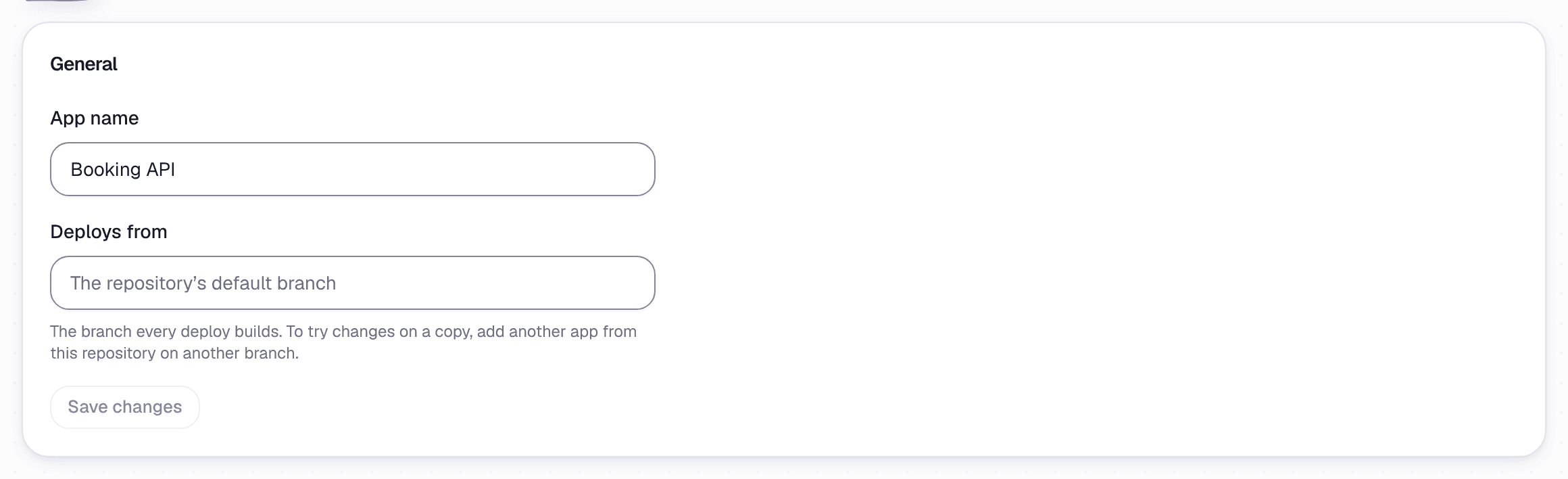 Settings, under General
Choose the branch
Open Deploys from and choose a branch from the list. When you save, GetFlowing checks on GitHub that the repository has that branch, and refuses one it does not have.
- If the repository has more branches than the list shows, the list says so. Type a branch's full name in its search, and choose Use with that name.
- If GitHub cannot list the branches, the field says why, and you can type the branch's name instead.
The next deploy builds the branch you saved.
Health check
The Health check card sets the path GetFlowing asks to check that the app is up, after each deploy and while it runs. The path must answer with a status from 200 to 399 within 5 seconds. It starts with a single /, never //, and holds letters, digits and . _ ~ / - only. Leave it empty for /. The new path is asked from the app's next deploy. See The health check.
Git
Where the app's code lives: its repository and the account that holds it, with Change on GitHub. Owners and admins can Move to another account, to any connected account where GitHub finds the same repository. If GetFlowing hosts the code, this is where you take it with you. See Code GetFlowing hosts for you.
Domains, Database and Variables
- Custom domains: put the app on your own domain.
- Databases: a managed PostgreSQL database, or your own.
- Variables and secrets: the settings and secrets your app reads.
What the builder remembers
On plans with the agent, the agent keeps notes about the app so its decisions stay safe and consistent: its Architecture, Known risks and Business rules. This section shows them. They are written by the agent; you cannot edit them here.
Take an app offline
Taking an app offline stops it serving and removes what runs it, while keeping the app in GetFlowing, with its code, variables and deployment history. Its managed database is kept too. At the bottom of the app's Settings, under Danger zone, choose Take offline beside Take app offline. GetFlowing lists what will be removed and what is kept. Type the app's name to confirm, and GetFlowing takes it down in a few minutes.
The app then shows Paused and stops answering on its address. To bring it back, press Deploy. Only owners and admins can take an app offline.
Transfer an app
Owners and admins can hand an app to another member of the workspace with Transfer app, under Danger zone: choose Transfer, choose the member, then Confirm transfer. The member you choose becomes responsible for the app, and it stays in the same workspace.
Delete an app
Deleting an app removes it for good and frees its place on your plan.
- Take the app offline first. GetFlowing refuses to delete an app that is still running, or one that is deploying.
- Under Danger zone, beside Delete app, choose Delete, type the app's name to confirm, and choose Delete app.
Once an app has been deployed, only an owner or admin can delete it. Its custom domains, releases and stored variables go with it. Its managed database is locked and kept for 30 days, in case the app was deleted by mistake. See When you delete an app. A database of your own is not touched.
If GetFlowing hosts the app's code, it keeps the repository after the app is deleted, until you delete your workspace. To keep a copy of your own, take it with you under Git before you delete the app.
There is no restart button. A new value in an app's variables reaches it the next time it starts, which is usually its next deploy.
Without a Dockerfile
Which stacks GetFlowing builds with no Dockerfile, the versions and start commands it picks, the variables it asks for, and what to do when it cannot.
Variables and secrets
Set the environment variables and secrets your app reads on GetFlowing, choose which are secret, and keep secrets out of your code and repository.