

Environment variables and secrets
Set the environment variables and secrets your app reads on GetFlowing, choose which are secret, and keep secrets out of your code and repository.
Your app reads its settings and secrets from environment variables. You set them in GetFlowing, never in your code or in a file in your repository.
Where to set them
Open the app's Settings, under Variables. The Environment variables card lists every variable, with:
- Add variable, to add one name and value.
- Paste a .env file, to add several at once.
- Scan repository, to list the variables your code reads.
Owners, admins and members can change variables. Viewers can only look. Variable names use letters, numbers and underscores, and cannot start with a number.
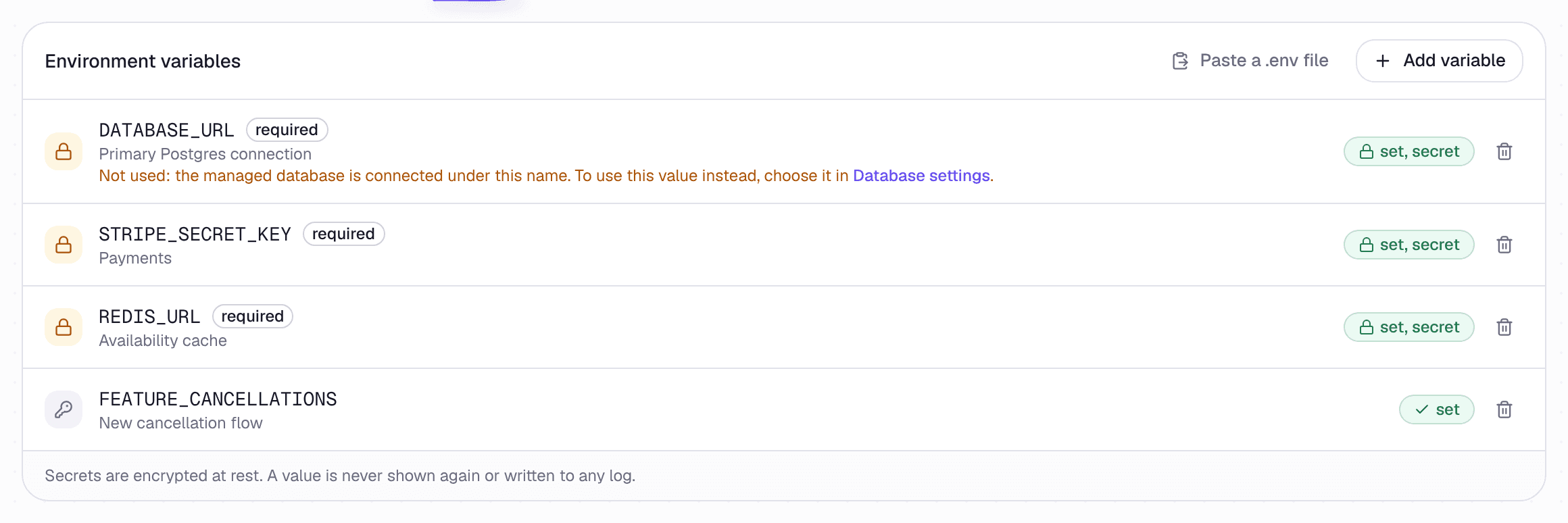 The app's Settings, under Variables
Secrets and plain values
Each variable is either a secret or a plain value.
- A secret is encrypted, stored apart from your app, and never shown again in the dashboard. Choose Store as a secret for keys, tokens, passwords and connection strings. It is ticked by default.
- A plain value is given to your app as it is. Use it for settings that are not secret, such as a feature switch.
Each variable shows whether it is set, secret, set or missing. Neither kind of value is shown in the dashboard once saved. You can switch a variable between secret and plain only while it is empty.
When a change takes effect
Saving a variable does not deploy your app. Your app gets the new value the next time it starts, which is usually its next deploy. There is no restart button: deploy the app to use the new value now.
- Replacing a value asks you to confirm. The new one replaces the old one for good.
- Removing a plain variable stops your app getting it from its next deploy.
- Removing a secret deletes the stored value at once. The running app keeps going for now, but it cannot start again while it still reads the secret: a deploy, a crash or scaling up fails until you set it again or take it out of your code. Deploy soon after you remove one.
Saving a variable never waits for approval. The deploy that picks it up does, where your workspace asks before each deploy of a released app. See Approvals.
Variables GetFlowing finds for you
When you import an app, GetFlowing can scan the repository for the variables it reads: from .env.example and similar files, compose files, and the code itself. It adds what it finds with no value, marked found in your repo, so you can see what to fill in. It never replaces a variable you already have, and names that look like credentials are set to be secrets. Use Scan repository to scan again after a change.
Commit a .env.example with each variable's name and no value, so the scan finds every one.
Variables GetFlowing sets
PORT: always 8080. Do not set it yourself. See What every app needs.DATABASE_URL, or the name your code reads: the connection string of the app's managed database, given to it as a secret, if it has one. See Databases.PHX_HOST, for a Phoenix app GetFlowing builds without a Dockerfile, whoseconfig/runtime.exsreads it: the app's address, set by every deploy, unless you setPHX_HOSTyourself. See Phoenix.
Values used while building
Variables are given to your app when it runs. When GetFlowing writes the app's Dockerfile, its build is also given the variables a front end reads while it builds, by their prefix: NEXT_PUBLIC_ for Next.js, VITE_ for Vite, REACT_APP_ for Create React App, PUBLIC_ for Astro and SvelteKit, GATSBY_, VUE_APP_, EXPO_PUBLIC_, and FRESH_PUBLIC_ for Fresh. A changed value reaches the app at its next deploy, which builds it again.
A variable marked secret is never given to the build, whatever its prefix: its value would be in the pages every visitor downloads. The deploy names any it left out. If one is meant for the browser, unmark it as secret; if not, rename it without the prefix.
With a Dockerfile of your own, the build is given none of your variables. Read a value at run time instead, or put a value that is not secret in your Dockerfile. See Variables the build reads.
Keep secrets out of your code
- Never commit
.envor any file holding a secret. GetFlowing does not remove one for you. If one was committed, change the secrets in it. - Never copy
.envinto the image in your Dockerfile. - Never print a secret in your app's logs. GetFlowing hides values that look like secrets in the logs it shows, but it cannot recognise every one.
- A connected AI assistant cannot read or set variables or secrets. They stay with people, in GetFlowing.
There is a limit on how many secrets your account can store, across all its apps and workspaces. If you reach it, the dashboard says so when you save.
App settings
Rename an app, choose the branch it deploys from, see where its code lives, and take an app offline, hand it to someone else or delete it.
Custom domains
Every app gets its own address on GetFlowing. Add your own domain, set the DNS records GetFlowing shows you, and HTTPS is set up for you.